← Previous | 🏠 Home | Next →
1. Overview of AI Visual Content Creation

Step-by-step diffusion process in generative image synthesis: progressive forward noise addition and reverse denoising reconstruction
Welcome to Module 07! Moving from text-based LLMs to visual generative AI represents a massive leap in creative potential. Visual models (primarily based on Diffusion architectures) translate textual descriptions into pixels by recognizing patterns learned from billions of images. Whether you are generating concept art, UI/UX mockups, marketing assets, or short cinematic films, mastering these tools requires a specialized skill set known as “Visual Prompt Engineering.”
In this module, we will explore the deepest capabilities of modern image and video generators, dissecting their unique strengths, and learning how to control them precisely.
2. Comprehensive Image Generation Tool Guide
Midjourney (v6 / v7)
Midjourney remains the gold standard for artistic, highly detailed, and photorealistic imagery.
- Workflow: Operates primarily via Discord, though a web interface is rolling out for power users.
- Strengths: Unmatched cinematic lighting, texture details (skin, fabric), and stylistic interpretation.
- Key Parameters:
--ar 16:9(Aspect ratio)--stylize 0-1000(How strongly to apply Midjourney’s default aesthetic)--weird 0-3000(Introduces unconventional visual elements)--cref <url>(Character reference for consistent faces)--sref <url>(Style reference to mimic the visual vibe of another image)--v 6.0or--v 6.1(Model version)
DALL-E 3 (via ChatGPT / Bing)
OpenAI’s DALL-E 3 is built for prompt adherence and narrative illustration.
- Workflow: Accessible via ChatGPT Plus or Bing Image Creator (free).
- Strengths: Understands complex instructions (“a cat reading a book while a dog serves coffee”), handles text rendering exceptionally well, and requires almost zero “prompt engineering” (ChatGPT rewrites your prompt for it).
- Weaknesses: Can have a distinct “AI look” (smooth, overly vibrant) and applies heavy censorship on public figures/styles.
Stable Diffusion (SDXL, SD3) & Flux
Open-source titans that offer unparalleled control for advanced users.
- Workflow: Run locally on your GPU (using ComfyUI or Automatic1111) or via cloud platforms (Civitai, RunPod).
- Strengths: No censorship, free to run locally, and supports ControlNet (allowing you to dictate poses, edges, and depth maps).
- Flux: A recent state-of-the-art open-source model that rivals Midjourney in realism and beats it in text generation. Highly recommended for local enthusiasts.

Latent Diffusion Model architecture incorporating cross-attention conditioning mechanisms to guide image synthesis from text
Ideogram & Leonardo AI
- Ideogram: The undisputed king of typography. If you need a logo, a t-shirt design, or a meme with exact text, Ideogram handles words better than any other model.
- Leonardo AI: A massive suite of finetuned models. Excellent for game developers needing isometric assets, sprites, or fast UI concepting. Offers Realtime Canvas for drawing-to-image workflows.
3. The Anatomy of a Perfect Visual Prompt
Visual prompting is like directing a movie. You need to tell the AI about the subject, the camera, the lighting, and the film stock.
Structure: [Subject] + [Setting/Action] + [Camera Angle & Lens] + [Lighting] + [Style/Medium] + [Parameters]
Vocabulary for Visual Prompting
Camera Angles:
- Extreme Close-Up (ECU): Focuses on an eye or a specific detail.
- Close-Up (CU): Head and shoulders.
- Medium Shot (MS): Waist up.
- Wide Shot (WS) / Establishing Shot: Shows the entire environment.
- Drone Shot / Aerial View: Looking down from high above.
- Low Angle / Worm’s Eye View: Looking up at the subject (makes them look powerful).

Principles of depth of field (DoF) and aperture variations for subject isolation and bokeh effects in photography prompts
Lighting Keywords:
- Cinematic Lighting: Dramatic, movie-like contrast.
- Volumetric Lighting / God Rays: Light beams passing through dust or fog.
- Golden Hour: Warm, soft light just before sunset.
- Neon / Cyberpunk: Harsh pinks, blues, and bright glows.
- Studio Lighting: Clean, well-lit, professional portrait lighting.
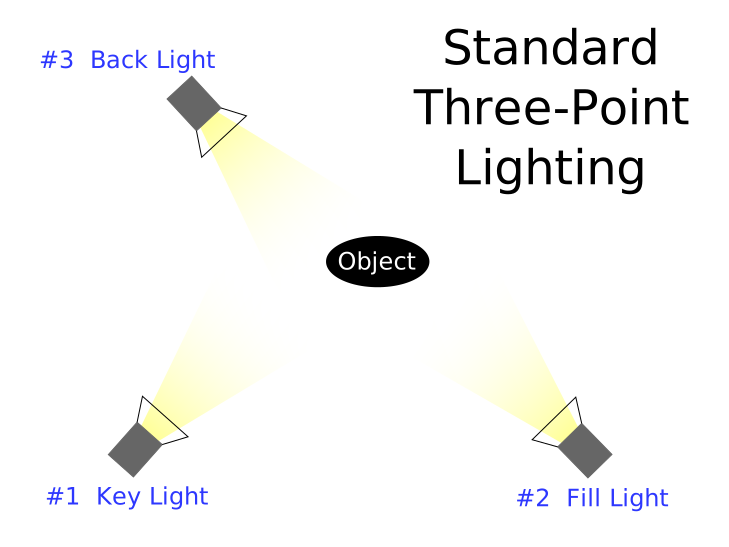
Three-point lighting setup (key light, fill light, backlight) providing dimensional depth and cinematic contrast in visual prompts
Style & Medium Keywords:
- Photography: 35mm lens, Kodak Portra 400, DSLR, RAW photo, polaroid.
- Traditional Art: Oil painting, watercolor, charcoal sketch, impasto, Ukiyo-e (Japanese woodblock).
- Digital/Commercial: Vector illustration, 3D render, Unreal Engine 5, Octane Render, UI/UX mockup, isometric 3D.
4. 20+ Master Prompts for Various Use Cases
Photography & Realism
- Cinematic Portrait:
Medium shot of a weathered fisherman in a yellow raincoat on a stormy dock, rain hitting his face, cinematic lighting, Kodak Portra 400, 85mm lens, photorealistic, 8k --ar 16:9 - Food Photography:
Macro shot of a gourmet double cheeseburger on a rustic wooden board, melting cheese, steam rising, dark background, studio food photography, crisp focus --ar 4:5 - Macro Nature:
Extreme close-up of a jumping spider with water droplets on its head, resting on a bright green leaf, morning dew, macro lens, bokeh background --ar 3:2 - Street Photography:
Candid street photography of a bustling Tokyo alleyway at night, neon signs reflecting in puddles, cyberpunk vibe, Fujifilm XT4, nostalgic feel --ar 16:9
Commercial & Design
- Modern UI/UX:
UI/UX design for a modern fitness tracking mobile app, sleek interface, dark mode with neon green accents, dashboard with charts, dribbble style, 3d isometric presentation --ar 16:9 - Minimalist Logo:
A minimalist vector logo of a geometric fox head, gradient orange and purple, flat design, white background, corporate identity --no text --ar 1:1 - Product Mockup:
A blank white skincare pump bottle sitting on a marble podium, surrounded by monstera leaves, soft natural lighting, commercial product photography --ar 4:5 - Isometric Room:
3D isometric view of a cozy hacker bedroom, multiple monitors glowing, empty pizza boxes, messy bed, synthwave color palette, octane render --ar 1:1
Art & Illustration
- Children’s Book:
A cute watercolor illustration of a bear wearing a red scarf, drinking tea in a forest, pastel colors, soft edges, whimsical, Studio Ghibli style --ar 3:2 - Dark Fantasy:
Epic concept art of a towering gothic castle surrounded by a moat of lava, flying dragons in the sky, dark fantasy, Greg Rutkowski style, highly detailed, 4k --ar 16:9 - Anime Style:
Anime style illustration of a high school girl looking out of a train window at a futuristic city, sunset, Makoto Shinkai style, vibrant skies --ar 16:9 - Vector Art:
Flat vector illustration of people working in a modern office, minimal details, corporate memphis style, blue and yellow color palette, clean lines --ar 16:9 - Stained Glass:
A beautiful stained glass window depicting an astronaut floating in space, sunlight shining through the colored glass, intricate details --ar 4:5 - Paper Cutout:
Multi-layered 3D paper cutout art of an underwater coral reef, colorful fish, depth of field, shadow box effect --ar 1:1
Text & Typography (Use in Ideogram / Flux)
- Vintage Poster:
A vintage 1950s travel poster. Large bold text that says "VISIT MARS". Illustration of a retro rocket landing on a red planet, distressed texture. - Neon Sign:
A glowing neon sign attached to a brick wall. The sign clearly reads "OPEN LATE". Deep blue night time lighting. - T-Shirt Design:
A trendy streetwear t-shirt design featuring a grim reaper drinking coffee. Bold typography that says "NOT MORNING PERSON". Vector, flat colors, white background. - 3D Typography:
The word "OXYGEN" made out of floating, transparent water bubbles. Bright, airy lighting, photorealistic 3D render.
Creative & Weird
- Surrealism:
A giant clock melting over a futuristic skyscraper, desert landscape, Salvador Dali style surrealism, highly detailed --ar 16:9 - Hybrid Creature:
A realistic photo of a creature that is half owl and half leopard, perched on a snowy branch, National Geographic photography, sharp focus --ar 3:2
5. Step-by-Step: Creating a Consistent Branded Image Series
A common challenge is generating a campaign where images look like they belong together. Here’s a professional Midjourney workflow:
Step 1: Define the Core Brand Elements.
Let’s say we are branding a premium eco-friendly skincare line called “Aura”. The aesthetic is minimalist, earthy, soft sunlight, and sage green tones.
Step 2: Generate the “Anchor” Image.
Prompt: Commercial photography of a blank sage green skincare bottle on a sandstone rock, soft morning sunlight, shadows of palm leaves, minimalist, earthy tones, high-end beauty product --ar 16:9
Generate this until you find the perfect image.
Step 3: Capture the Style Reference.
Click the image, copy its URL. This becomes your Style Reference (--sref).
Step 4: Create Variations with the Same Vibe.
Now, append --sref [URL] to all your new prompts.
Prompt 2: A beautiful female model applying face cream, smiling gently, minimalist, earthy tones --sref [URL] --ar 16:9
Prompt 3: A macro shot of a drop of water falling onto a sage green leaf, minimalist, earthy tones --sref [URL] --ar 16:9
Step 5: Ensure Color Consistency.
Use a specific color palette in your prompts. If the AI deviates, add specific hex codes or color names (e.g., #8A9A5B, muted sage).
6. Video Generation Deep Dive
Video AI is advancing from simple motion graphics to highly coherent cinematic clips. Video generators (Runway, Sora, Kling, Minimax) generally operate in two modes:
- Text-to-Video (T2V): Typing a prompt and letting the AI invent the scene.
- Image-to-Video (I2V): Uploading an AI-generated image (from Midjourney) and telling the video AI to animate it. This yields vastly superior results.
Major Video AI Tools
- Sora (OpenAI): The breakthrough model. Generates up to 60 seconds with incredible physical consistency. Currently limited access.
- Runway Gen-3 Alpha: The industry standard for creators. Features “Motion Brush” (paint over an area to make only that area move) and detailed camera controls.
- Kling AI: Chinese model that rivals Sora. Excellent for realistic human motion, facial expressions, and complex physics (like eating food).
- Minimax / Hailuo: Incredible prompt adherence. If you type “A man walks past a red car, then a blue bird flies over”, it follows the chronological sequence perfectly.
- Pika: Great for stylized animations, 3D, anime, and lip-syncing audio to characters.
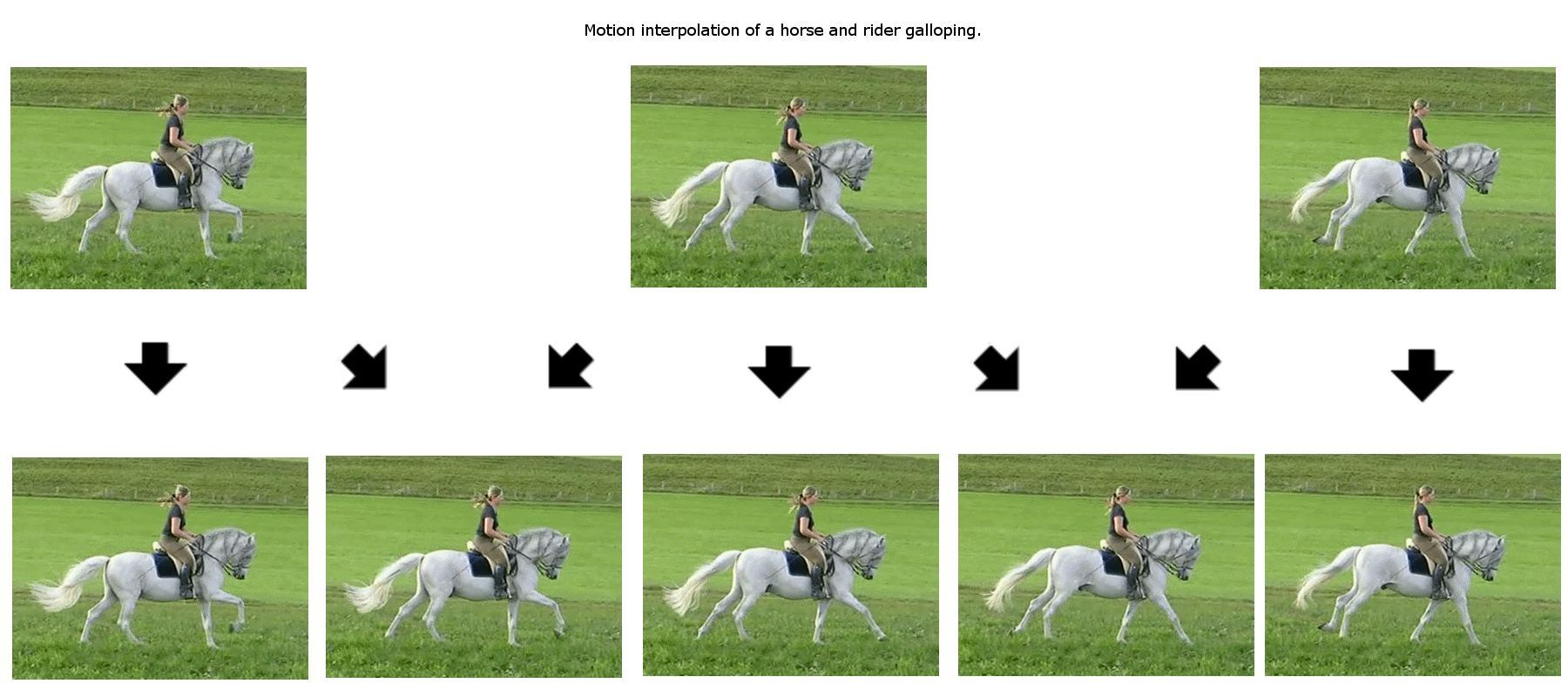
Motion interpolation and continuous temporal reconstruction between video frames in AI video generation
Video Prompting Techniques & Examples
Video prompts focus heavily on motion and time. Do not just describe the scene; describe the camera movement and subject movement.
Camera Movement Keywords:
Pan left / Pan rightTilt up / Tilt downZoom in / Dolly outFPV drone shot / Tracking shot / Crane shot
Example Video Prompts:
- Establishing Shot:
FPV drone shot flying rapidly through a dense neon-lit cyberpunk city, weaving between flying cars, rain hitting the lens, highly dynamic motion. - Slow Motion:
Slow motion 120fps. A glass of red wine shattering on a marble floor, liquid splashing dramatically, hyper-detailed. - Character Action:
Tracking shot alongside a woman riding a horse through a snowy forest, snow kicking up from the hooves, cinematic lighting. - Time Lapse:
Time-lapse of a flower blooming from a bud to full blossom over a dark background, dynamic lighting changes. - Subtle Motion (Cinemagraph):
A static camera shot of a cozy cabin. The only movement is the smoke rising from the chimney and the gentle falling of snow.
7. Common Pitfalls & How to Avoid Them
- The “Plastic AI” Look: Images often look too smooth or saturated.
- Fix: Add keywords like
film grain, 35mm, amateur photography, raw photo, unedited. - Deformed Hands/Anatomy: AI struggles with fingers and limbs.
- Fix: Use negative prompts (
--no deformed hands, extra fingers). If using Stable Diffusion, use ControlNet to force exact hand poses. Or, zoom out so hands aren’t the focal point. - Flickering in Videos: Video AI often hallucinates textures over time, causing a “boiling” or flickering effect.
- Fix: Keep scenes short (3-5 seconds). Avoid fast pans across complex backgrounds. Use Image-to-Video for better baseline stability.
- Copyright & Ethics: Generating images of real living artists or trademarked characters (e.g., Mickey Mouse, Spider-Man) is risky for commercial work. Focus on generating original concepts.
8. Curated Resources
- Prompting Guides: Midjourney Alpha Guide, PromptHero
- Models & LoRAs: Civitai (The hub for all Stable Diffusion models)
- Video Workflows: RunwayML Academy
← Previous | 🏠 Home | Next →