← Previous | 🏠 Home | Next →
IMPORTANT DISCLAIMER: This module is strictly informational. It focuses heavily on legitimate technological alternatives, the vast open-source ecosystem, and operational workarounds (like alternative payment rails and API mirrors) that empower users to access AI technology safely. It does NOT provide guides on circumvention tools for bypassing local network filtering.

1. The Global Access Landscape
Using state-of-the-art AI from heavily sanctioned regions like Iran presents extreme friction. Top-tier providers (OpenAI, Anthropic, Midjourney) enforce strict geo-blocking. They block IPs, require phone numbers from unsupported regions for SMS verification, and rely on global credit card networks (Visa/Mastercard/Stripe) that are entirely disconnected from the Iranian banking system.
However, the AI industry is currently undergoing a massive open-source revolution. The dominance of closed-source models is fading, meaning you no longer need OpenAI to access frontier-level AI capabilities. There are countless accessible web endpoints, robust API mirrors, and powerful local models that operate with zero restrictions.
2. Fully Accessible Web Tools (No SMS Required)
Many AI services do not enforce strict SMS verifications or aggressive IP blocks, requiring only an email address.
| AI Platform | Underlying Models | Capabilities | Access Requirements |
|---|---|---|---|
| Google Gemini | Gemini 1.5 Pro / Flash | Multimodal text, coding, huge context window (1M-2M tokens). | Standard Google Account. |
| Microsoft Copilot | GPT-4o, DALL-E 3 | Web search, image generation, document analysis. | Microsoft Account (No SMS required for base features). |
| DeepSeek | DeepSeek V2/V3/R1 | World-class coding and reasoning. Rivals GPT-4o. | Email sign-up. Completely unrestricted. |
| Kimi (Moonshot AI) | Moonshot Models | Massive context window, excellent document parsing. | Email/WeChat sign-up. |
| Hugging Face Chat | Llama 3, Mistral, Command R | Open-source sandbox. Highly customizable. | Free account with Email. |
| Poe.com | Aggregator (Claude, GPT, etc.) | Daily free credits for premium models. | Email sign-up. |
| DuckDuckGo AI | GPT-4o mini, Claude Haiku | Anonymous chat, completely free, no logs. | No account required! |
3. Account Creation & Verification Alternatives
When a platform does require a foreign phone number:
- Virtual Phone Numbers (VNs): Millions of global users use VNs to manage digital identities. Services that provide clean, non-VoIP numbers (sometimes via crypto payment) are widely used to pass OTP (One-Time Password) checks. Look for services that offer “temporary SMS for verification.”
- Email Forwarding/Masking: Use services like SimpleLogin or Apple’s Hide My Email when registering on obscure AI platforms to protect your primary identity from potential data breaches.
4. Payment Alternatives & Cost Optimization
Upgrading to premium tiers (like ChatGPT Plus at $20/mo) without an international credit card:
- Gift Cards & Intermediary Resellers: The Iranian digital market has a robust ecosystem of legal intermediary companies (such as IraniCard, TehranPayment, etc.) that sell pre-loaded Virtual Credit Cards (VCCs) or offer direct account upgrade services by utilizing their international enterprise accounts.
- Cryptocurrency: Web3-friendly AI platforms (like specialized GPU rental services such as RunPod or Akash Network) accept stablecoins (USDT/USDC). This bypasses traditional banking networks completely.
- Cost Optimization (Maximizing Free Tiers):
- Instead of paying $20/mo to OpenAI, use API Aggregators like OpenRouter. You only pay per token. For most users, this costs less than $2 a month.
- Use Groq.com for ultra-fast, free inference of open-source models like Llama 3.
5. The Ultimate Solution: Open-Source Local Models
The most resilient, privacy-respecting, and uncensorable way to use AI is to run it on your own hardware. Once the model file (often in .gguf format) is downloaded, it requires absolutely no internet connection to operate. No API keys, no monthly fees, no geo-blocking.
Step-by-Step Guide: Setting Up Ollama
Ollama makes running massive language models as easy as installing a normal app.
- System Requirements: A Mac (M1/M2/M3), Windows PC, or Linux machine. Ideally 8GB+ of RAM for small models, 16GB+ for powerful ones.
- Download: Go to Ollama.com and download the installer for your OS.
- Install & Open Terminal: Once installed, open your command prompt or terminal.
- Run a Model: Type
ollama run llama3.1and press Enter. - The Download: Ollama will automatically download Meta’s Llama 3.1 model (approx 4.7 GB). This is a one-time download.
- Chat Offline: Once the download completes, a prompt
>>>will appear. You can now chat with a GPT-4 level intelligence completely offline. Unplug your router and try it!

Offline local execution of open-source Llama 3 in a Linux terminal using Ollama with zero internet dependency

Neural network compression techniques (GGUF quantization and weight pruning) enabling efficient inference on consumer hardware
Recommended Local Models to Try
ollama run llama3.1(Best general-purpose model, great reasoning).ollama run qwen2.5:7b(Exceptional at coding and multi-language support, including Persian).ollama run mistral(Lightweight, incredibly fast).
6. The “Mirror Endpoint” Workflow
What if you don’t have a powerful computer to run local models, but you still want an unrestricted ChatGPT-like experience? You use the API Mirror Workflow.
- Download a Local UI: Install Chatbox or AnythingLLM on your desktop. These are just “shells” (interfaces).
- Get an Aggregator API Key: Go to OpenRouter.ai (which does not block Iran) and sign up with an email. Generate an API Key. OpenRouter aggregates models from OpenAI, Google, and Anthropic.
- Connect: Open Chatbox settings, choose “OpenRouter” as your API provider, and paste your key.
- Result: You now have a desktop app that can instantly switch between Claude 3.5 Sonnet, GPT-4o, and Llama 3.1. You bypass the web restrictions of the main sites, and you only pay fractions of a cent per prompt (or use the free models on OpenRouter).
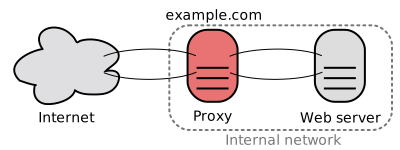
Reverse proxy and API gateway routing architecture connecting local clients to distributed AI endpoints
7. Common Pitfalls & Security Warnings
- The “Shared Account” Scam: Be extremely wary of local Telegram channels selling “ChatGPT Plus accounts for $5.” These are usually hacked, stolen, or illegally shared accounts that will be banned by OpenAI within days. You will lose your data and your money.
- Privacy Leaks with Telegram Bots: Many Iranian users use Persian Telegram bots that bridge to ChatGPT. WARNING: The developers of these bots can read every single prompt you send. Do not share proprietary code, passwords, or deeply personal information with unverified third-party bots.
- Malware in Fake Apps: Only download AI tools from official sources. Hackers often package malware into files labeled “ChatGPT Desktop Premium Cracked.”
8. Curated Essential Resources
- LM Studio (lmstudio.ai): An incredible graphical interface for finding and downloading local models.
- OpenRouter (openrouter.ai): The best unrestricted API aggregator.
- Hugging Face (huggingface.co): The “GitHub” of AI models.
- LMSYS Chatbot Arena (chat.lmsys.org): A free, blind-testing arena where you can use top-tier models for free to compare them.
← Previous | 🏠 Home | Next →