
🌟 Overview
Welcome to Module 1 of the Comprehensive AI Workshop! In this deeply expanded session, we will completely demystify Artificial Intelligence. We will peel back the layers of buzzwords to understand exactly how these systems function mechanically, logically, and practically.
Whether you are a non-technical professional looking to leverage AI in your daily workflow, or a developer aiming to build on top of APIs, understanding the fundamental architecture and limitations of Large Language Models (LLMs) is non-negotiable.
By the end of this module (which contains approximately 1-2 hours of study material and exercises), you will have an advanced beginner to intermediate understanding of AI mechanics, hyperparameters, and the current landscape of AI providers.
📚 1. The Core Hierarchy: AI vs. ML vs. DL vs. GenAI
The term “AI” is heavily overloaded in media. To use AI effectively, you must understand where modern tools fit within the broader computer science landscape.

1.1. Artificial Intelligence (AI)
The outermost conceptual circle. AI refers to any machine or system capable of exhibiting human-like cognitive functions (learning, problem-solving, planning).
- Examples: The chess-playing computer DeepBlue (1997), video game NPCs, basic route-finding algorithms in Google Maps.
- Key Takeaway: Much of “traditional AI” was rule-based. Humans wrote complex
if-then-elselogic, and the machine executed it rapidly.
1.2. Machine Learning (ML)
A massive paradigm shift within AI. Instead of programming explicit rules, engineers provide the machine with a learning algorithm and massive amounts of data. The machine identifies patterns and creates its own internal “rules.”
- Examples: Netflix’s recommendation engine, credit card fraud detection, traditional email spam filters.
- Key Takeaway: ML is highly effective at prediction and classification, but it typically requires structured data (like spreadsheets).
1.3. Deep Learning (DL)
A specialized subset of ML that uses “Artificial Neural Networks” with multiple layers (hence “deep”). These algorithms are inspired by the biological structure of the human brain.

- Examples: Tesla’s Autopilot computer vision, voice recognition in Siri, translating speech in real-time.
- Key Takeaway: Deep Learning thrives on unstructured data (images, audio, raw text) and requires massive computational power (GPUs).

1.4. Generative AI (GenAI)
A subfield of Deep Learning focused on creating new content rather than just analyzing or classifying existing content.
- Examples: Generating an image (Midjourney), writing a song (Suno), or synthesizing a new article (ChatGPT).
1.5. Large Language Models (LLMs)
The crown jewel of current GenAI. LLMs are deep learning networks trained on staggering amounts of text (essentially the entire public internet). They are “Large” because they contain billions (or trillions) of parameters, and they are “Language Models” because their primary function is to predict the next logical word in a sequence.
⚙️ 2. Under the Hood: How LLMs Actually Work
If you want to master prompting and AI usage, you must stop treating the AI like a human and start treating it like the probabilistic math engine that it is.
2.1. The Transformer Architecture
Before 2017, AI processed text using Recurrent Neural Networks (RNNs). RNNs read text sequentially (word 1, then word 2, then word 3). This was painfully slow and meant the AI often “forgot” the beginning of a long sentence by the time it reached the end.
In 2017, Google researchers published the landmark paper “Attention Is All You Need”, introducing the Transformer.

- Self-Attention Mechanism: Instead of reading sequentially, a Transformer looks at all words in a sentence simultaneously. It calculates mathematical relationships (attention weights) between every word. For the sentence “The bank of the river”, the attention mechanism knows “bank” refers to land, not money, because of its heavy mathematical association with “river.”
- Why it matters: This parallel processing allows models to be trained on massive datasets using GPUs, leading to the explosion of capabilities we see today.
2.2. Tokens and Tokenization
AI does not understand letters or words. It understands numbers. Tokenization is the process of breaking your text into numerical chunks.


- What is a token? A token can be a single character, a syllable, or a full word.
- The Golden Ratio (English): 1 token is roughly equal to 4 characters or 0.75 English words. (e.g., 100 tokens ≈ 75 words).
- Non-English Penalty: Languages like Farsi, Arabic, or Japanese are often split into many more tokens per word because the AI’s primary training data is English. A short Farsi sentence might consume 3x more tokens than its English translation.
- Why it matters: API costs are calculated per 1,000 or 1,000,000 tokens. Furthermore, models have token limits.
2.3. The Context Window
The Context Window is the AI’s short-term memory limit for a specific conversation.

- If a model has an 8,000 token context window, it can only “remember” about 6,000 words of the current conversation.
- Once the conversation exceeds 8,000 tokens, the AI starts “forgetting” the earliest messages in the chat. It operates on a sliding window principle.
- Modern capabilities: Claude 3.5 Sonnet has a 200,000 token window (about 500 pages of a book). Gemini 1.5 Pro has a 2,000,000 token window.
2.4. Hallucinations
Because LLMs are just predicting the most statistically likely next word, they don’t actually know facts. If you ask for a biography of a non-existent person, the AI might invent a highly convincing, realistic-sounding life story. This is called a hallucination. The AI isn’t lying; it is just completing a pattern.

🎛️ 3. Mastering Hyperparameters
If you use AI via an API or advanced playground interface, you will see settings like Temperature and Top-P.
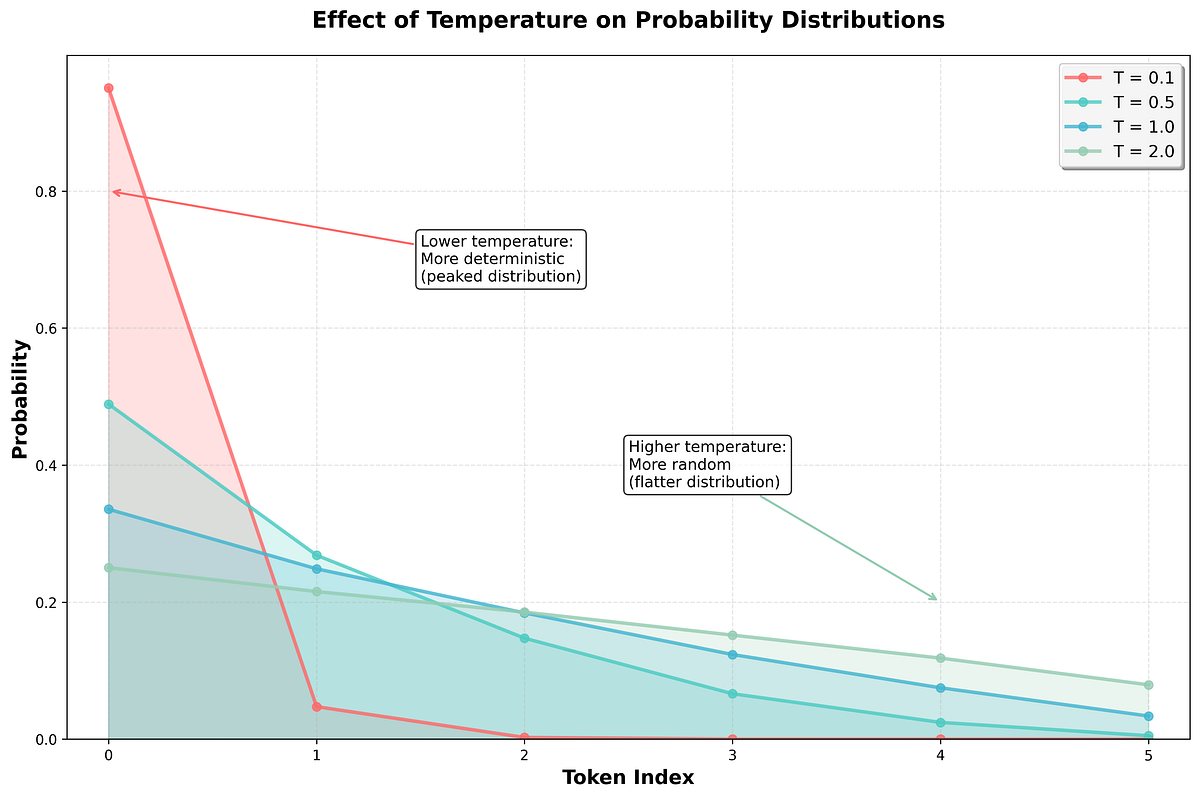
Temperature (Range: 0.0 to 2.0)
Controls the randomness or creativity of the output.
- Temperature = 0.0: Deterministic. The model will almost always choose the highest-probability next word. Best for coding, math, fact-extraction, and data formatting.
- Temperature = 0.7 – 1.0: The standard default. Good for conversational chat and drafting emails.
- Temperature = 1.5+: Highly random. The model will choose lower-probability words, leading to chaotic, highly creative, but potentially nonsensical outputs. Best for brainstorming unique names or poetry.
Top-P (Range: 0.0 to 1.0)
Another way to control randomness. A Top-P of 0.9 means the model only considers the words comprising the top 90% of probable next words. It cuts off the completely crazy/irrelevant options.
- Best Practice: Alter Temperature OR Top-P, rarely both at the same time.
Max Output Tokens
Limits how long the AI’s response can be. Useful to prevent the AI from generating unnecessarily long essays when you only want a short answer.
🏛️ 4. The Giant Model Comparison (2024-2025 Landscape)
The ecosystem is dominated by a few major players. Here is a comprehensive breakdown.

🟢 1. OpenAI (The Industry Standard)
- Flagship Models: GPT-4o (Omni), GPT-4.5, o1/o3 (Reasoning models).
- Context Window: Usually 128k tokens.
- Strengths: Best overall ecosystem, incredible voice mode (Advanced Voice), highest user adoption, very strong logic. The ‘o’ series models “think” before they speak, solving incredibly hard math and coding problems.
- Pricing: Free tier available (rate limited). Plus subscription is $20/month.
🟣 2. Anthropic (The Developer’s Favorite)
- Flagship Models: Claude 3.5 Sonnet (Speed/Code), Claude 3 Opus (Heavy reasoning), Claude 3.5 Haiku (Fast/Cheap).
- Context Window: 200k tokens.
- Strengths: Claude is universally praised for its natural, human-like writing style (less corporate than ChatGPT). Sonnet 3.5 is currently considered the absolute best model in the world for coding and web development. Its “Artifacts” UI allows you to view code/websites directly in the chat.
- Pricing: Free tier (highly restricted). Pro is $20/month.
🔵 3. Google (The Ecosystem Giant)
- Flagship Models: Gemini 1.5 Pro, Gemini 1.5 Flash.
- Context Window: Up to 2,000,000 tokens.
- Strengths: Unrivaled context window. You can upload entire 1000-page PDF textbooks or 1-hour video files directly into the prompt. Deep integration with Google Docs, Gmail, and Google Drive.
- Pricing: Free tier (very generous). Advanced is $20/month (included with Google One AI).
🟡 4. DeepSeek (The Cost-Effective Disruptor)
- Flagship Models: DeepSeek V3, DeepSeek R1.
- Context Window: 128k tokens.
- Strengths: DeepSeek R1 is a reasoning model (like OpenAI’s o1) but open-weights and incredibly cheap. It matches or beats GPT-4o in math and coding but costs a fraction of the price via API. Very popular among startups.
- Pricing: Very generous free web usage. API costs are disruptive (cents per million tokens).
🟠 5. Meta / Open Source Ecosystem
- Flagship Models: Llama 3.1 (8B, 70B, 405B), Mistral (France), Qwen (Alibaba).
- Context Window: Varies (8k to 128k).
- Strengths: You can download these models and run them on your own laptop (if you have the RAM/GPU) using software like LM Studio or Ollama. Absolute privacy (no data sent to the cloud), zero censorship, and highly customizable.
- Pricing: 100% Free.
💳 5. Free vs Paid Tiers: Detailed Comparison
| Feature | Free Tier (ChatGPT, Claude) | Paid Tier ($20/month) |
|---|---|---|
| Primary Model | GPT-4o mini, Claude 3.5 Haiku | GPT-4o, o3, Claude 3.5 Sonnet |
| Usage Limits | Strict limits (e.g., 10 msgs/day on flagship) | High limits (e.g., 80 msgs/3 hours) |
| Speed/Availability | Slower, unavailable during peak | Priority queue, faster token generation |
| Advanced Tools | Basic web search, limited data upload | Advanced Data Analysis, Python execution, Image Generation (DALL-E) |
| Customization | Standard system prompt | Create custom AI agents (GPTs/Projects) |
🛠️ 6. Comprehensive Hands-On Exercises
To truly grasp the differences between models and understand tokenization, complete these three exercises.
Exercise 1: The Token Test
- Go to the OpenAI Tokenizer.
- Type the following English sentence: “Artificial intelligence is transforming the technological landscape.” Note the token count.
- Translate that sentence to Persian using Google Translate: “هوش مصنوعی در حال تغییر چشمانداز فناوری است.”
- Paste the Persian text into the tokenizer.
- Observation: You will see the Persian text uses significantly more tokens because the characters are encoded differently. This demonstrates why non-English users hit API limits faster.
Exercise 2: The Hallucination Trap
- Open ChatGPT (or Claude).
- Prompt: “Write a detailed 3-paragraph biography about the famous 19th-century Persian clockmaker, Dr. Farshid Zaman-Sanj, who invented the spring-loaded astrolabe.”
- Observation: Dr. Farshid Zaman-Sanj does not exist. However, the AI will likely invent a very convincing story about his life, birth city, and legacy.
- Lesson: Never trust LLMs for pure facts about niche or non-existent subjects without giving them web-search capabilities.
Exercise 3: Cross-Model Logic Testing
- Open ChatGPT, Claude, and Gemini in three separate tabs.
- Provide this exact prompt to all three:
“I have a 5-liter jug and a 3-liter jug, and an unlimited supply of water. I need exactly 4 liters of water. However, there is a twist: I cannot lift the 5-liter jug if it has more than 3 liters of water in it because it’s too heavy for me. How can I measure exactly 4 liters?”
- Observation: Watch how the models attempt to solve the logic puzzle. Do they catch the constraint about the 5-liter jug weight? (Often, standard models fail this because they regurgitate the standard Die Hard 3 water jug solution without paying attention to your custom constraint).
⚠️ 7. Deep Dive: Common Pitfalls & How to Avoid Them
- The “Google Search” Mentality:
- Mistake: Typing “Best Italian restaurants near me” into a standard offline LLM prompt.
- Fix: Use AI tools integrated with real-time search (Perplexity, Microsoft Copilot) for real-time queries.
- Context Window Overflow:
- Mistake: Having a 3-month-long mega-chat where you ask the AI to do 50 different tasks. Eventually, the AI forgets the initial instructions and goes crazy.
- Fix: Open a New Chat for every new task. Keep context clean.
- Implicit Bias and Alignment:
- Mistake: Assuming the AI is completely objective.
- Fix: Recognize that models are “aligned” (safety-trained) by their parent companies. They may refuse to generate certain code, answer controversial questions, or adopt highly specific ideological tones. If this hinders your work, use Open Source models.
- Failure to Verify Code:
- Mistake: Copy-pasting AI-generated code directly into a production server without reading it. The AI might invent libraries or use deprecated syntax.
- Fix: Always ask the AI: “Are you sure these libraries and functions are current as of 2024?” or manually review documentation.
🔗 8. Curated Resources for Deep Learning
- Articles & Concepts:
- The Illustrated Transformer by Jay Alammar – The absolute best visual guide to how Transformers and Attention work.
- Understanding LLMs: A Comprehensive Guide – Anthropic’s research blog.
- Tools:
- LMSYS Chatbot Arena – A crowdsourced leaderboard where you can blind-test two different models against each other.
- Hugging Face Models – The “GitHub” of machine learning models.
- LM Studio – Download the app to run open-source models offline on your personal computer.
← Previous | 🏠 Home | Next →