← Previous | 🏠 Home | Next →

Overview of the AI-Assisted Coding Revolution
The landscape of software development is undergoing a fundamental shift. Artificial Intelligence is no longer just a research topic or a novelty; it is an active, deeply integrated participant in the coding process. AI coding assistants are capable of understanding context, writing boilerplate code, identifying complex logic bugs, and even suggesting large-scale architectural improvements. This revolution doesn’t replace developers; rather, it supercharges their productivity, allowing them to focus on high-level logic, system design, and user experience rather than syntax and repetitive tasks.
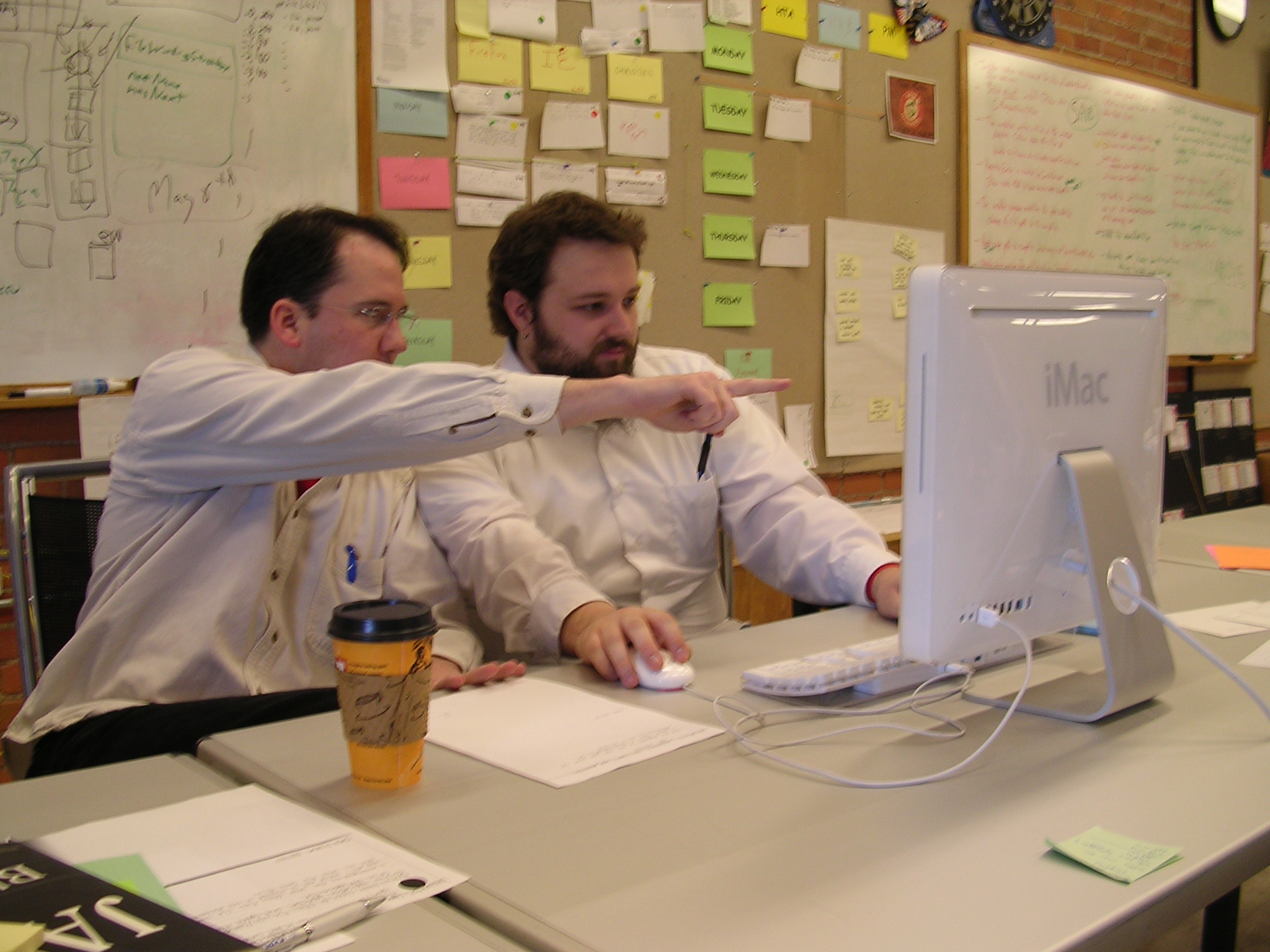
Pair programming reimagined: collaborative real-time code synthesis between developers and AI models
Historically, developers relied on IntelliSense and simple autocomplete tools that suggested keywords or variable names based on static analysis. Modern AI assistants, powered by Large Language Models (LLMs) such as GPT-4, Claude 3.5 Sonnet, and Gemini 1.5, operate differently. They ingest vast amounts of context—including multiple open files, directory structures, and natural language comments—to generate entire functions, classes, or even whole files.
By the end of this module, you will understand how to properly integrate these tools into your daily workflow, how to write effective prompts specifically for software engineering, and how to navigate the pitfalls and security concerns associated with AI-generated code.
Comprehensive Comparison of Major AI Coding Tools
Choosing the right tool is critical for your workflow. Here is a deep dive into the current market leaders:

Modern DevOps toolchain lifecycle and points of continuous AI augmentation
| Tool | Core Technology | Key Features | Pricing | Best For | IDE Support |
|---|---|---|---|---|---|
| GitHub Copilot | OpenAI GPT-4 | Deep GitHub integration, inline ghost text, Copilot Chat, Pull Request summaries | $10/mo (Free for students/OSS/Teachers) | General purpose coding, enterprise teams | VS Code, Visual Studio, JetBrains, Neovim |
| Cursor | Claude 3.5 Sonnet & GPT-4o | AI-first IDE fork of VS Code, deep codebase indexing (Cmd+K), multi-file edits (Composer), seamless UI | Free tier, $20/mo Pro | Developers wanting deeply integrated AI without context friction | Standalone IDE (VS Code fork) |
| Windsurf / Codeium | Proprietary + LLMs | Excellent free alternative, fast completion, deep codebase indexing, “Flow” mode | Free for individuals, Enterprise tiers | Budget-conscious developers, fast iterations | VS Code, JetBrains, standalone IDE |
| Amazon Q Developer | AWS proprietary models | Deep AWS integration, security scanning, automated code upgrades (Java), serverless optimization | Free tier, $19/mo Pro | AWS-centric teams, enterprise legacy modernization | VS Code, JetBrains, AWS Cloud9 |
| Gemini Code Assist | Gemini 1.5 Pro | Google Cloud integration, massive 1M-2M context window, natural language cloud operations | Included in GCP / Workspace | GCP users, analyzing entire codebases at once | VS Code, JetBrains, Cloud Workstations |
| Cody (Sourcegraph) | Claude 3.5 Sonnet / GPT-4o | Context-aware chat using Sourcegraph’s code search graph, local context fetching | Free tier, $9/mo Pro | Navigating massive, unfamiliar enterprise codebases | VS Code, JetBrains, Neovim |
| Claude (Projects) | Claude 3.5 Sonnet | Web-based, massive context window, Artifacts (visual UI rendering), excellent reasoning | $20/mo (Claude Pro) | Prototyping UIs, complex algorithmic logic, reviewing architecture | Web UI (Anthropic), API |
Deep Dive: GitHub Copilot
GitHub Copilot is the industry standard. Once installed in VS Code, it constantly analyzes the files you have open.
Pro Tip: To get the best out of Copilot, leave relevant files open in other tabs. Copilot uses the contents of open tabs as its context window to infer your project’s structure and variable naming conventions.
Deep Dive: Cursor IDE
Cursor is a paradigm shift. Unlike an extension (like Copilot), Cursor is a full IDE built around AI.
- Cmd+K / Ctrl+K: Highlights code and allows you to type a prompt to edit it in place.
- Composer: Allows you to ask Cursor to build features that span multiple files (e.g., “Add a dark mode toggle” -> edits CSS, React components, and local storage logic simultaneously).
- Codebase Indexing: You can tag
@Codebasein chat, and Cursor will use embeddings to search your entire repository for relevant context before answering.
How to Use AI for Different Coding Tasks
1. Writing New Code from Descriptions
Instead of starting with a blank file, you can describe what you want in natural language. The key is specificity.
- Bad Prompt: “Write a login function.”
- Good Prompt: “Write an async Node.js login function using Express and bcrypt. It should accept
emailandpasswordfrom the request body, validate them, query a PostgreSQL database using pg-promise, and return a JWT token valid for 24 hours. Include error handling for invalid credentials and server errors.”
2. Complex Debugging Workflow
When you encounter a stack trace or an unexpected result, AI can help pinpoint the issue.
- Isolate the Error: Copy the entire stack trace.
- Provide Context: Copy the function or file where the error originated.
- Prompt the AI: “I am receiving the following stack trace when I try to execute
processData(). The input is an array of 500 user objects. Here is the code and the error. What is causing this, and how can I fix it?” - Iterate: If the AI’s first suggestion doesn’t work, reply with the new error message.
3. Code Review and Optimization
AI can act as a second pair of eyes, looking for inefficiencies, memory leaks, or style violations.
- Prompt: “Review this React component for performance bottlenecks. Look specifically for unnecessary re-renders, missing useCallback/useMemo hooks, and inefficient DOM updates. Suggest optimized refactoring.”
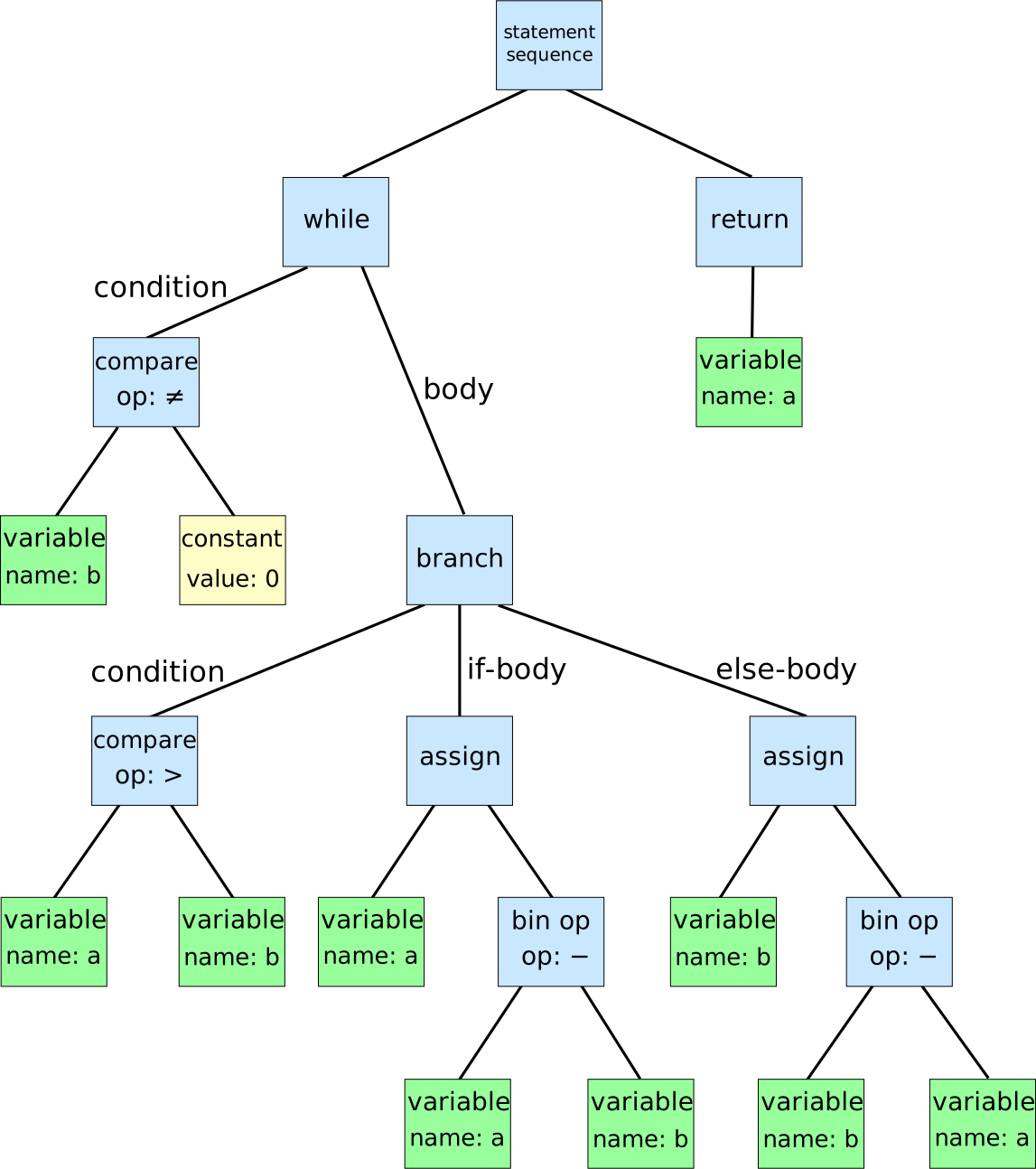
Abstract Syntax Tree (AST) representation used by language models and compilers for semantic code analysis
4. Test-Driven Development (TDD) and Test Generation
Writing tests is tedious but crucial. AI excels at generating comprehensive test suites.
- Prompt: “Generate a comprehensive Jest test suite for the
calculateInvoiceTotalfunction. Include tests for standard inputs, edge cases (empty arrays, negative discounts), and error throws. Mock the externalTaxServicedependency.”

The Test Automation Pyramid: prioritizing unit tests, integration tests, and UI verification
5. Documentation and Onboarding
Keep your codebase readable without spending hours writing comments.
- Prompt: “Add JSDoc comments to all public methods in this class. Explain the purpose, parameters, return types, and any exceptions thrown. Then, generate a Markdown summary of the class for the project README.”
6. Legacy Code Refactoring
Clean up messy or legacy code.
- Prompt: “Refactor this nested if-else block (callback hell) into a modern async/await structure. Use early returns to reduce nesting and improve readability. Ensure error handling is preserved using try/catch.”
15+ Advanced Prompt Engineering Examples for Developers

Compiler pipeline stages: lexical analysis, parsing, semantic verification, and code generation
Effective communication with AI requires structured prompts. Save these templates:
- Architecture Setup: “I am starting a new full-stack Next.js 14 project with Tailwind CSS and Supabase. Generate a standard directory structure and the contents of the
package.jsonwith recommended dependencies.” - API Design: “Design a RESTful API for a library management system. Provide the endpoints, HTTP methods, input parameters, and expected JSON responses for managing books and users.”
- Complex SQL: “Write an optimized PostgreSQL query to find the top 5 customers who have spent the most money in the last 30 days, grouped by their country. Include a JOIN with the
ordersandcountriestables.” - Regex Magic: “Write a Python regular expression that extracts valid IPv4 addresses from a messy log file. Explain each part of the regex.”
- Security Audit: “Review this PHP login script. Identify any vulnerabilities related to SQL Injection, XSS, or CSRF. Provide the corrected code using PDO prepared statements.”
- Translation (Language to Language): “Translate this C++ class that handles matrix multiplication into an equivalent, idiomatic Rust struct with implementation blocks.”
- Translation (Framework to Framework): “Convert this React class component that uses lifecycle methods (
componentDidMount) into a functional component usinguseEffectanduseState.” - Bash Scripting: “Write a robust bash script that backups the
/var/www/htmldirectory, compresses it into a tar.gz file with the current date, moves it to an AWS S3 bucket, and deletes local backups older than 7 days.” - Dockerization: “Create a
Dockerfileanddocker-compose.ymlfor a Node.js application. It requires a Redis cache and a MongoDB database. Ensure the Node.js container runs as a non-root user for security.” - Git Wizardry: “I accidentally committed sensitive API keys in my last 3 commits and pushed them to origin. Give me the exact git commands to completely remove this file from the git history and force push the changes.”
- CSS Grid/Flexbox: “Write the CSS (or Tailwind classes) to create a responsive dashboard layout. It should have a fixed sidebar on desktop, a top navbar, and a main content area that uses CSS Grid to display 3 columns of cards that collapse to 1 column on mobile.”
- Algorithm Explanation: “Explain how the A* (A-star) pathfinding algorithm works. Use a simple analogy, and then provide a basic implementation in Python.”
- Accessibility (a11y): “Review this HTML form. Update the markup to be fully compliant with WCAG 2.1 AA standards, including ARIA labels, semantic HTML, and keyboard navigation support.”
- Type Safety: “Convert this plain JavaScript utility file into strict TypeScript. Define appropriate interfaces for all object parameters and avoid using the
anytype.” - Performance Profiling: “I have a Python script processing a 10GB CSV file that is running out of memory. Suggest strategies to process this file in chunks using generators or pandas chunksize, and provide the updated code.”
Full Step-by-Step Tutorial: Building a React Web App with AI
Goal: Build a functional “Expense Tracker” web app using React, complete with a dashboard, form inputs, and local storage persistence.
Prerequisites: Have Cursor IDE installed or VS Code with GitHub Copilot/Claude.
Phase 1: Project Initialization
- Open your terminal and run:
npx create-react-app expense-tracker - Open the folder in your IDE.
- AI Prompt (in Cursor Chat / Copilot): “I am building a React Expense Tracker. What dependencies should I install for styling, icons, and charting? Please provide the npm install command.”
- Expected AI output:
npm install lucide-react recharts tailwindcss...
- Expected AI output:
Phase 2: Component Architecture
AI Prompt: “Outline the component structure for an Expense Tracker app. We need a header, a form to add expenses (title, amount, category, date), a list to display them, and a summary chart.”
- Action: Create the files suggested by the AI (
Header.jsx,ExpenseForm.jsx,ExpenseList.jsx,Dashboard.jsx).
Phase 3: Building the State Management
Open App.js.
AI Prompt: “Write the core state management for the Expense Tracker in App.js. Use useState to store an array of expenses. Include addExpense and deleteExpense functions. Add a useEffect hook to load and save the expenses to localStorage so they persist across reloads.”
Phase 4: Building the Form
Open ExpenseForm.jsx.
AI Prompt: “Create a form component that takes addExpense as a prop. It should have controlled inputs for Title (text), Amount (number), Category (select dropdown: Food, Transport, Utilities, Entertainment), and Date (date picker). Prevent default form submission and clear the form after submitting.”
Phase 5: Styling & Polish
Once the logic works, use AI to make it look good.
AI Prompt (using Cursor Cmd+K on the whole file): “Refactor this component to use Tailwind CSS classes for styling. Make it look like a modern, clean dashboard with soft shadows, rounded corners, and a blue primary color.”
Best Practices and Security Considerations
- Trust, but Verify: LLMs suffer from “hallucinations.” They might invent a library that doesn’t exist or use a deprecated API. Always run the code, review the logic, and check official documentation.
- Security Context: NEVER paste proprietary company secrets, customer PII (Personally Identifiable Information), or production API keys into consumer AI tools like ChatGPT. If using an enterprise tool (like Copilot for Business), ensure data sharing settings are configured to opt-out of training data collection.
- Avoid “Prompt and Dump”: Do not ask the AI to write a 1,000-line monolithic file. Break your problem down. Ask it to write small, testable functions (composition).
- Understand the “Why”: If an AI provides a complex regex or algorithm to fix a bug, ask it: “Explain how this works step-by-step.” Do not merge code you do not understand; you will have to maintain it.
- Static Analysis Integration: AI should complement, not replace, standard tooling. Continue using linters (ESLint), static analysis tools (SonarQube), and vulnerability scanners (Dependabot).

Git version control branching workflow for verifying, reviewing, and safely merging AI-generated code
Hands-on Workshop Exercise
The Challenge: You are going to build and debug a small Python utility script that analyzes server log files.
Part 1: Generating the Code
- Open your IDE. Ask your AI to “Write a Python script that reads a log file named
server.log. It should count the occurrences of HTTP status codes (200, 404, 500) and print a summary table.” - Run the code. (Create a dummy
server.logfile with some fake data first).
Part 2: Debugging
- Intentionally introduce a bug into the script (e.g., change a variable name inside a loop so it throws a
NameError, or misindent a block). - Run the script, copy the error output.
- Paste the error into the AI and ask for a fix. Observe how it identifies the issue.
Part 3: Extending Functionality
- Ask the AI: “Update the script so that instead of printing to the console, it generates a simple HTML report with a bar chart using the
matplotliborplotlylibrary.” - Implement the changes and view your generated report.
Common Pitfalls
- The Context Cliff: LLMs have a context window limit. If you paste 10 huge files into a prompt, the AI might “forget” instructions from the beginning of the prompt.
- Over-reliance: Using AI to write basic logic without understanding it stunts your growth as a developer. Use AI as a mentor, not an outsourcing agency.
- Outdated Patterns: AI models are trained on historical data. If a new version of a framework (e.g., React 19, Next.js App Router) was released recently, the AI might suggest older, deprecated patterns. Explicitly state the framework version in your prompt.
Curated Resources
- GitHub Copilot Official Docs
- Cursor IDE Documentation
- Anthropic Claude Prompt Library
- Learn Prompting: Software Development
← Previous | 🏠 Home | Next →